For delivery heads and resource management offices
How to reduce bench time in a services team
A weekly bench review that works: windows, a priced idle week, a named next task for every person, and one action each. With a worked example.

Short answer. To reduce bench time, review the bench every week with a fixed window (free now, in 30, 60 and 90 days), price each idle week from your rate card, and pair every person with the open work they could take before they are idle. FitRank's bench view builds that list for you; the decision to hold, move or train someone stays with a manager.
What bench time is, and who pays for it
In an IT services company the bench is the group of people who are employed but not currently billed to a client. Some bench is healthy: people between projects, people on a planned course, people held for a deal that is about to start. The problem is the unplanned part, the weeks someone sits idle because nobody connected them to the next piece of work in time.
Delivery heads and resource management offices carry this, but the cost lands on the whole business, because the salary cost of an idle person has no revenue against it. For the basic definition and the roles involved, read bench management: meaning, roles and real cost. This page is about the weekly routine that keeps the bench short.
An illustrative example: a Monday review
The names and figures below are invented to show the routine. They are not from any company.
On a Monday, a delivery head opens the bench list. Six people are either free now or free within 60 days. For each one she wants three things: the date they become free, what each idle week costs at the company's rate card, and a task they could move to. Two people have an open task that fits. One person is free in 45 days and the best open task needs a skill she is one course short of. Two people have nothing open that fits, but both are due to roll off a project in three weeks.
She makes four decisions in ten minutes. She asks the manager of the open task to look at the two matches this week. She books the course for the person who is one skill short, so she is ready on the free date. She holds one of the two roll-offs for a deal that is in negotiation, and she tells the recruiter that the second person is available to other teams from the free date. None of this needs a meeting. It needs the right list on a Monday.
How to run a bench review without software
- Fix the windows: free now, within 30 days, within 60, within 90. A person free in 80 days is a plan, not a problem, but only if you see them 80 days ahead.
- Add the free-from date for everyone coming off a project. The end date of the current allocation is the most useful field in the whole sheet.
- Price the idle week. Use a rate for each cost band, not salaries, so the number can be shared without exposing anyone's pay.
- For each person, name up to three open tasks they could take. If you cannot name one, that itself is information: it points to a skill gap or a demand gap.
- Decide one action per person: move, hold for a known task, upskill, or release to other teams.
- Write the date you will look at the person again.
How FitRank handles it
- The bench view lists who is free now or in 30, 60 or 90 days, with each person's free date and the idle cost per week worked out from your rate card. Salaries are never stored, only the cost band. See bench and roll-offs.
- Each person carries up to three open tasks they could take, taken from the latest matching runs rather than guessed, so the list uses the same rules and facts as any other match.
- A rolling-off view shows who leaves a project soon, the task they could move to and the one skill they are short of. That is the early warning, weeks before the idle time starts.
- The staffing dashboard adds the bigger picture: bench idle cost for the next 12 months worked out day by day if nothing new is booked, including the part held by people who fit an open task, which is the part you can still avoid. It can be downloaded as CSV. See the staffing dashboard.
- From the list you can hold someone for a known task or plan upskilling. The view suggests; it does not assign anyone.
The dashboard's idle-cost chart is not a forecast of what will happen. It shows what idle time would cost if nothing new were booked, which is the number you are trying to bring down.
A checklist for a weekly bench review
- Everyone with a free-from date inside 90 days is on the list.
- Each person has a priced idle week and a named next task, or a note on why there is none.
- Anyone idle for more than a few weeks has a written reason and an owner.
- Roll-offs are reviewed three to six weeks before the end date, not on it.
- Skills on the profile were confirmed in the last six months.
- Holds are time-limited. A person 'held' for a deal that has gone quiet is bench in disguise.
Common mistakes
- Reporting the bench without destinations. A list of free people tells you the size of the problem, not what to do about it.
- Looking only at people free today. By the time someone is idle, the cost is already paid.
- Holding people for deals indefinitely. Put an end date on every hold.
- Letting profiles go stale, so the match suggestions come from skills nobody has used for years. The data-health view shows which profiles are due.
- Treating the bench as a failure of the people on it. It is nearly always a visibility problem.
When FitRank is not the right tool
If the bench is two or three people, a shared sheet and a weekly chat is enough, and a tool adds ceremony. If your problem is that there is no work at all, no matching will fix demand: the bench view helps you use the work you have, not create it. It prices idle time from a rate card you provide, so it cannot tell you the true cost of a person; it gives a consistent estimate. And it does not replace the people conversation around a roll-off.
Questions people ask
Where does the idle cost number come from?
From the weekly cost you set for each cost band in your rate card, for the time a person is free. FitRank does not store salaries.
Does the bench view assign someone to a task?
No. It shows the tasks a person could take. A manager still runs matching on the task and decides.
How early does the roll-off warning appear?
It uses each person's current project end date, so you see people coming off projects as far ahead as the end dates you have recorded.
Can we export the idle-cost picture?
Yes, the 12-month bench idle cost on the dashboard can be downloaded as CSV.
How do I know a person's skills are current?
Each skill carries a level, years and when it was last used, and HR can confirm profiles against resumes. The skill matrix template shows the format if you want to start in Excel.
The features that do the work
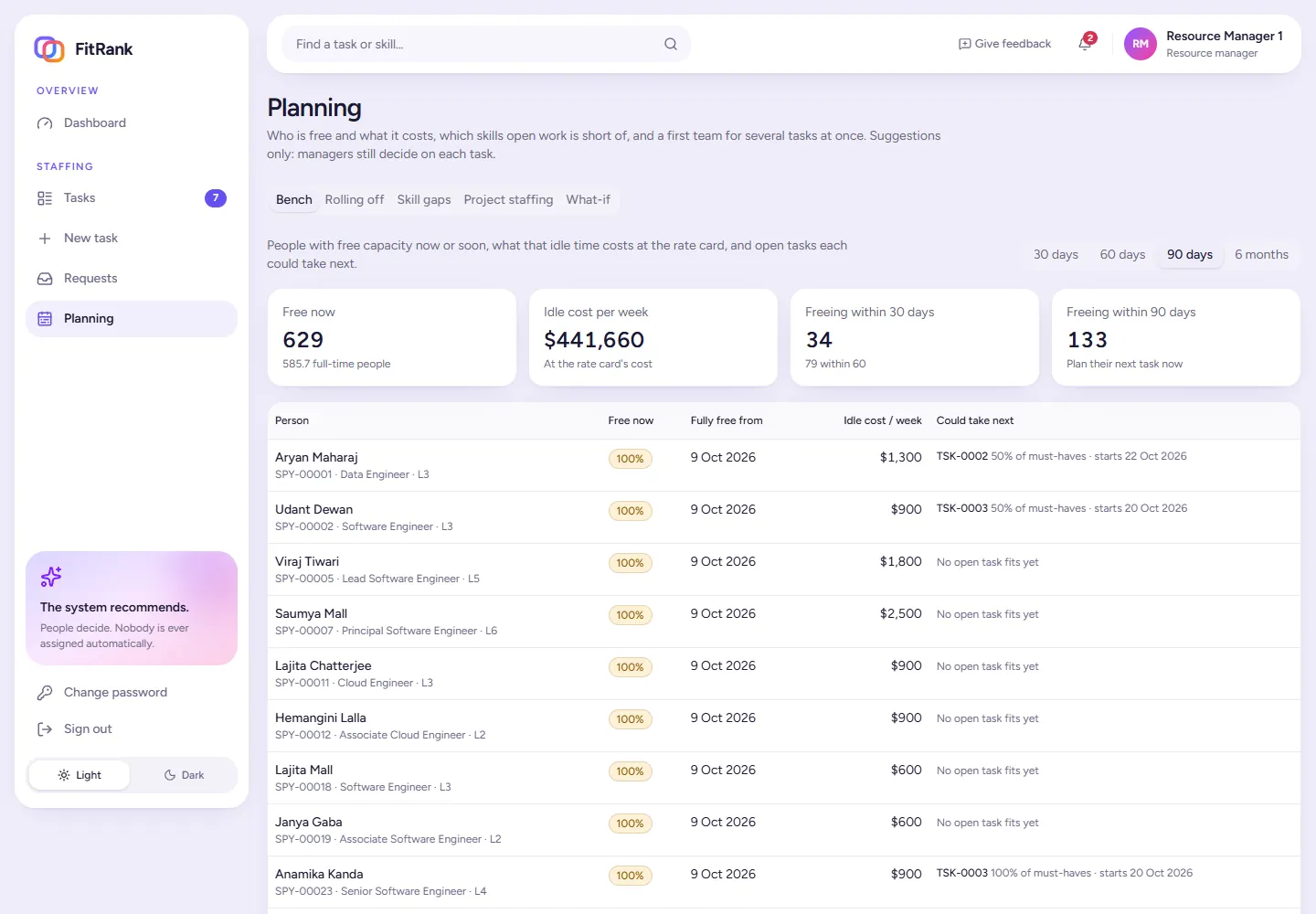 Bench and roll-offsSee who is free now or within 30, 60 or 90 days, the weekly idle cost, and the open tasks each person could take next, with roll-off warnings.
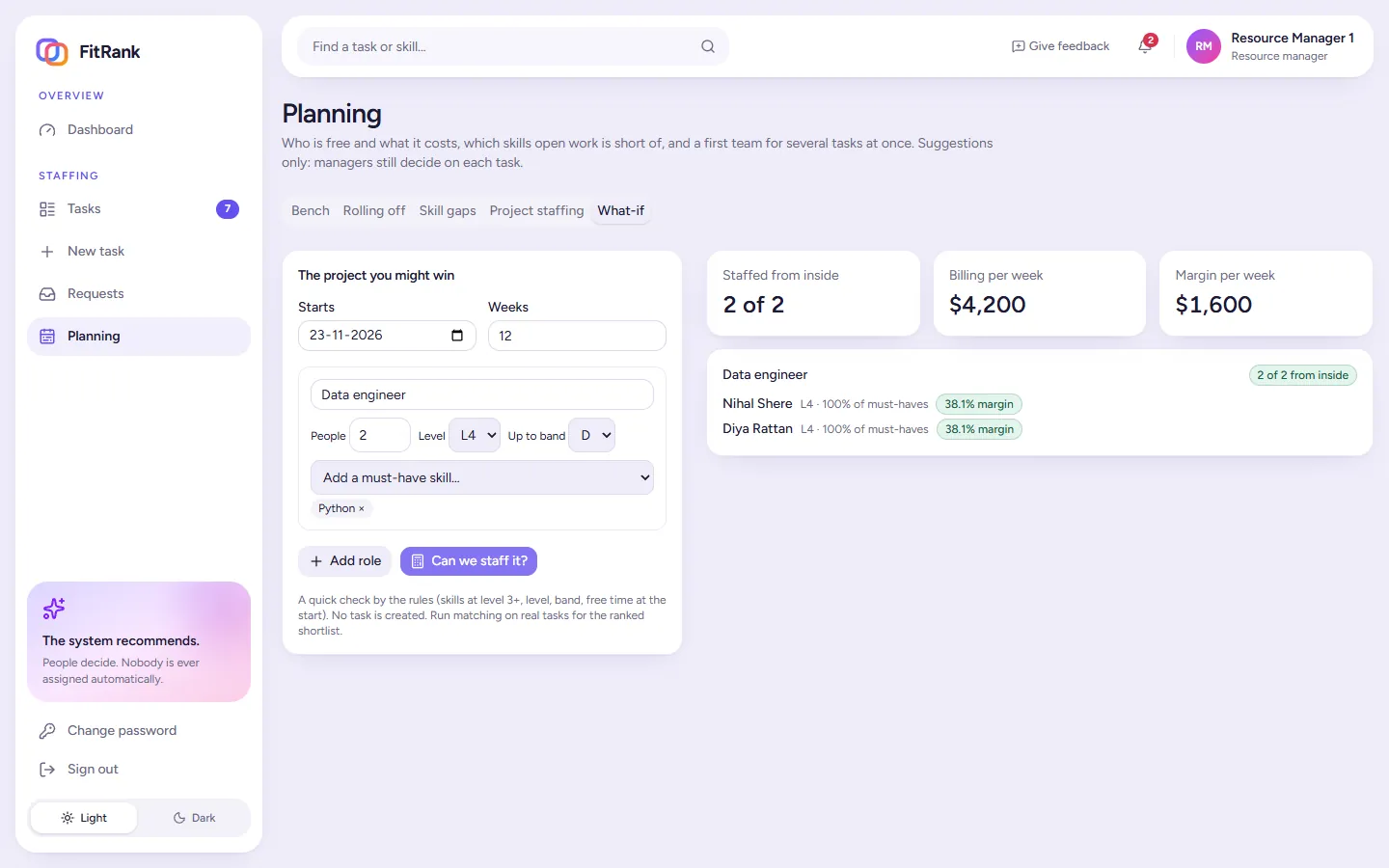 Pre-sales: what-if staffing and client profilesTest a prospective project against the real bench, with billing and margin per week, then send each proposed person's client profile. No task is created.
More use cases
Be one of the first teams to staff with FitRank
We're taking on a small number of pilot companies. Pre-register for early access, or talk to us about an annual licence.